A “skill” is basically an old-school preset: a package of reusable instructions your agent can load to follow best practices or a specific workflow. That way you don’t have to re-explain everything from scratch in every conversation (mega pain in the ass)
What it DOESN’T solve
Here comes the part people don’t talk about as much:
- It’s not a real standard (yet). There are attempts, but right now it’s more marketing than serious interoperability.
- They degrade over time. A skill can age out in months. You have to version and maintain it (unless someone does it for you).
- Supply-chain risk (important). If you install third-party skills that include scripts/executables, you’re literally bringing code into your flow. At minimum: review the contents, pin versions, and default to distrust.
- If someone sells you skills as the “ultimate solution,” they’re probably selling you the headline.
What it DOES solve
LLMs have a limited context window. If you stuff documentation, standards, internal rules, and examples into every request, two things happen:
- You burn tokens and time.
- Results get inconsistent: nails it today, makes stuff up tomorrow.
The whole point of Skills is simple: the assistant loads what it needs when it needs it, instead of dragging around a giant prompt all the time. Less fluff, more consistency.
Open ecosystem (with caveats)
Anthropic was one of the first to push the idea, but this is moving toward something more reusable: community directories, cross-tool compatibility, and integrations (or serious attempts) in projects like Supabase, Remotion, and friends.
“Works across environments” is the goal… but today it’s not guaranteed, honestly. Tool support changes, names change, how skills are loaded changes, how scripts run changes. There’s a lot of “works if you happen to use X with Y.”
Two websites that act as skill directories for LLMs:
What they look like under the hood
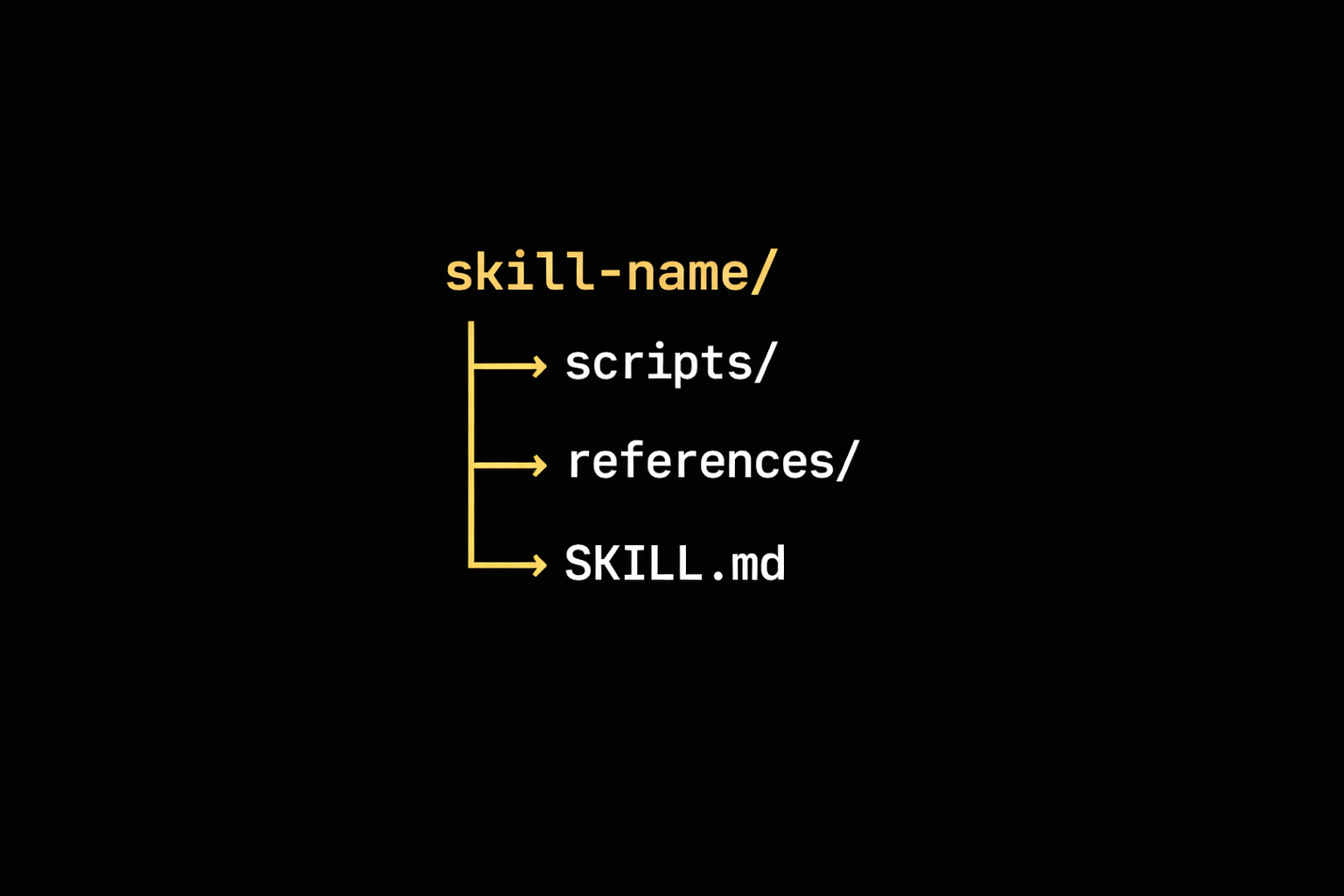
Usually it’s a folder with an instructions file (like SKILL.md) and, if needed, some code/utilities.
Typical paths depending on editor/environment:
- Cursor:
.cursor/skills/<skill-name>/SKILL.md - Windsurf:
.windsurf/skills/<skill-name>/SKILL.md - Claude Code:
.claude/skills/<skill-name>/SKILL.md - OpenAI Codex (CLI):
.codex/skills/skills/<name>/SKILL.md - GitHub Copilot:
.github/skills/skills/<name>/SKILL.md - OpenCode:
.opencode/skills/<name>/SKILL.md
And here’s the trick: instead of dumping EVERYTHING into context, the agent can use tools when it makes sense (e.g., extract tables from a PDF) and work off the result. It’s like having a drawer full of cheat sheets ready for the exam.
Installation and usage (npx)
If you want to use skills made by others (you can grab them from the sites I recommended above), you can use the Vercel package skill add or from the generic add-skill.
Install a specific skill:
npx skill add <user>/<repo>
Example:
npx skill add vercel-labs/agents-skills
What does this do?
- Downloads the skill files.
- Automatically creates the symlink in the agent’s config folder (e.g.
.cursor/skills/). - Registers it so the agent recognizes it immediately.
Building your own Skills
Minimum structure:
new-skill/
├── SKILL.md       <-- Instructions
├── scripts/       <-- Optional: executable scripts
└── references/    <-- Optional: docs or examples
The most important file: SKILL.md
Usually it’s Markdown with a YAML block at the top, for example:
---
name: my-mega-dumbass-skill
description: Helps optimize processes lol
---

# Instructions
- Bro don’t use ANY please.
- Avoid SELECT * at all costs.
Good examples of Skills
- Framework best practices (React, Next, etc.)
- Design + tone guides (copy, UX writing, branding)
- Automation (reviews, refactors, checks, tests)
- Docs: extract tables, reformat, summarize, transform
- Even skills to help you create skills (XD)
If it’s a repeatable or super specific workflow, it probably makes sense to package it as a Skill.
Conclusion
Agent Skills turn a generalist assistant into a specialist: less repetition, fewer tokens wasted, and—most importantly—more consistency.
The more the ecosystem grows, the easier it’ll be for your assistant to adapt to your stack and how you actually work. If you want one practical takeaway: install the skills that remove daily friction. You’ll feel the productivity bump fast.